WDACManager Platform
WDACManager provides a centralized platform for managing Microsoft Windows Defender Application Control (WDAC) policies across enterprise environments.
While WDAC delivers one of the most powerful application control mechanisms available on Windows, operating it at scale can be difficult. Organizations must manage complex policy structures, maintain large rule sets, and deploy policy updates safely across many endpoints.
WDACManager simplifies these tasks by providing a structured platform that manages the full WDAC policy lifecycle — from telemetry analysis and rule generation to policy deployment and operational monitoring.
Security teams can manage WDAC through a centralized interface while preserving the security model and enforcement mechanisms of native WDAC.
Policy Lifecycle Management
- WDACManager provides a structured workflow for managing WDAC policies throughout their lifecycle.
- Security administrators can create, edit, merge, and maintain base and supplemental policies without directly editing XML or relying on complex PowerShell scripts.
- The platform maintains policy version history and allows administrators to safely roll back changes when required.
- This ensures WDAC policies remain maintainable even as environments evolve.
Application Abstraction
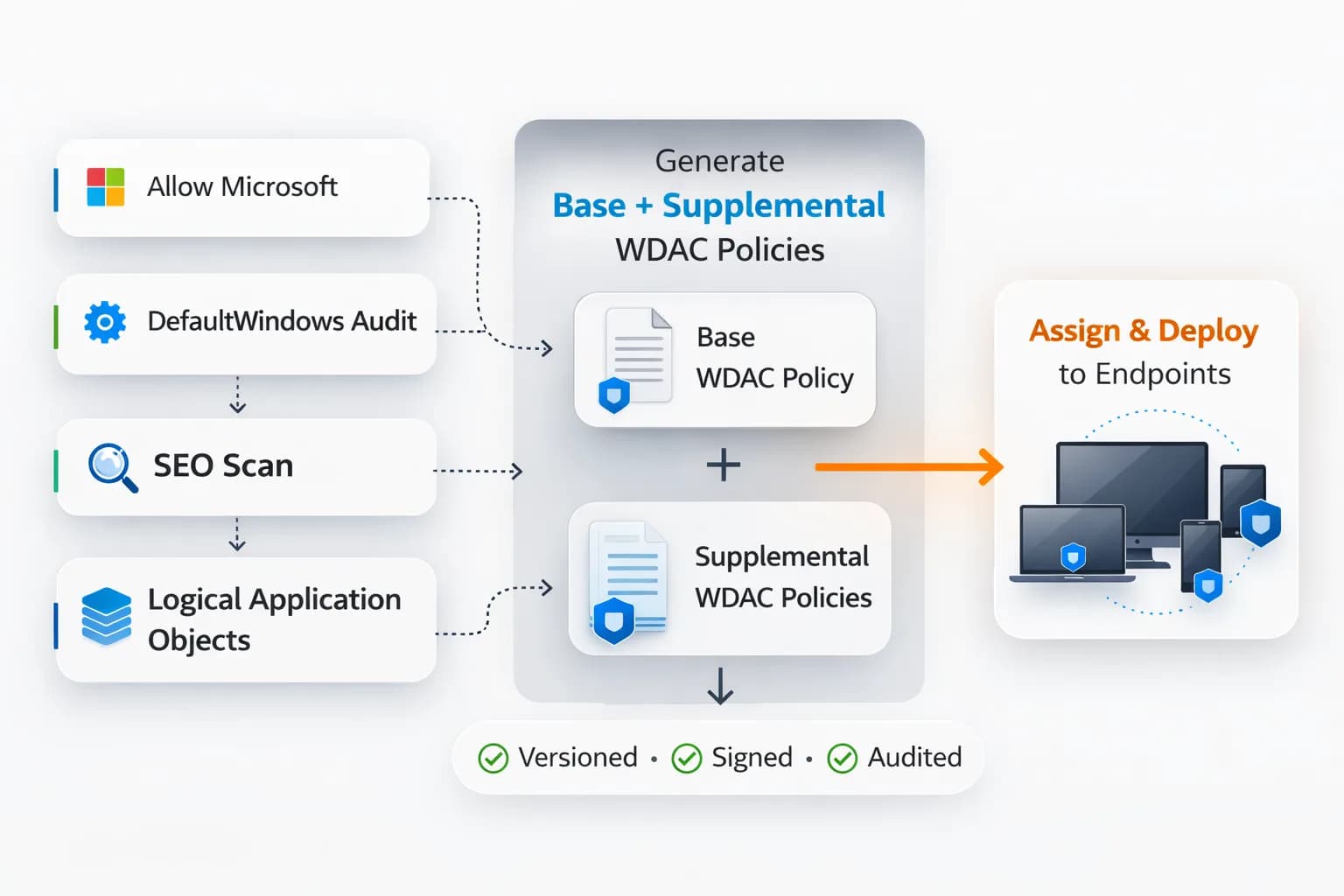
- WDACManager introduces the concept of "Applications" which are collections of certificates and hashes managed under one unit.
- Applications can then be included in Base or Supplemental WDAC policies (both as allow or deny). If an application collection changes, every policy that contains this application will also change automatically.
- When a vendor updates a certificate, update the Logical Application once, and WDACManager automatically regenerates and deploys all associated base and supplemental policies.
Automated Policy Generation
- WDACManager can generate WDAC policies using application telemetry collected from Microsoft Defender for Endpoint or Windows Event Logs (via WDACManager-Client).
- By analysing application execution activity, administrators can identify legitimate applications that should be allowed and quickly incorporate them into policy rules.
- Policies are automatically validated and rebuilt before deployment.
Policy Deployment
- Once policies are generated or updated, WDACManager can deploy them across the environment using existing enterprise deployment mechanisms.
- Updated WDAC policies are automatically pushed into Microsoft Intune as a WIN32 application or Application Control for Business (ACfB).
- WDACManager Windows client can be deployed optionally for maintaining WDAC policies across your infrastructure.
OneCode Workflow
- Securely bypass strict application control temporarily when critical business operations require immediate ad-hoc execution.
- Without permanently modifying baselines, administrators generate a secure, time-bound algorithm token for users to unlock blocked applications.
- Removes the operational delay of raising deployment tickets for urgent application approvals while securely retaining an impenetrable security posture.
- All temporary executions are cryptographically limited, tracked, and natively re-enforced once the session expires.
Operational Visibility
- Maintaining WDAC environments requires insight into application execution activity and policy enforcement results.
- WDACManager integrates telemetry from Microsoft Defender for Endpoint and Windows Event logs to provide visibility into:
- policy enforcement events
- deployment results
- installation activity
- This allows security teams to understand how application control policies behave in real environments.
How it works
The WDACManager workflow follows a structured operational cycle:
- Endpoints send application execution telemetry to Microsoft Defender for Endpoint or Windows Event logs.
- WDACManager collects the logs and allows searches and visual filtering to identify potential application updates.
- Security administrators review and approve applications.
- WDACManager generates and updates WDAC policies automatically.
- Policies are deployed to endpoints via Microsoft Intune (WIN32 or ACfB).
- Endpoints enforce the updated policies using native WDAC enforcement.
This provides full visibility and control over application execution across your organization.
 Automation
 Simple Application Management
 Easy Compliance
Air-Gapped and Secure Environment Support
Engineered for complete operational independence, WDACManager functions seamlessly within fully isolated and highly classified environments. It natively ingests WDAC Windows Events centrally or actively across the fleet via the WDACManager client without requiring external dependencies.
Policy distribution is robust and adaptable, supporting direct endpoint enforcement via the WDACManager client, ensuring absolute control in restricted networks.
Event Collection
- Install the WDACManager client as a centralized collector to ingest forwarded Windows Events from multiple endpoints.
- Alternatively, deploy agents directly on all workstations for granular telemetry collection.
- Capture exact SOE Baselines and comprehensive software deployments securely offline.
Policy Deployment
- Maintain and enforce strict WDAC policies across distributed networks using the WDACManager Windows client.
- Achieve incredibly fast policy switching and propagation (minutes, not hours) inside air-gapped segments.
- Retain full functionality of the temporary OneCode algorithm, enabling rapid ad-hoc unblocking without internet dependencies.
Software Capturing
- Capture absolute baseline states (SOE) to use as uncompromised starting points for zero-trust WDAC policies.
- Intercept application installation workflows directly to build logical WDACManager Applications perfectly tailored for restricted enforcement policies.